








- Capacity's ROI calculator helps contact centers and customer support leaders to project potential cost-savings with new AI tools across channels.
- Input your amount of interactions, cost per interaction and other crucial KPIs to model what you're spending now—and see what you could save.
- Build an AI strategy using real numbers, get executive buy-in with a personalized report and start working smarter.
Customers want faster service. Agents need more assistance and actionable insights. Support costs keep rising. And AI tools aren’t one-size-fits-all.
Customer service leaders shouldn’t have to guess at value before investing in a new AI solution. Every support strategy and team is different. So if you’ve been wondering, “Will AI actually save me any money?”, why not calculate your real ROI?
Designed for customer support and contact center teams, Capacity’s AI ROI calculator models projected savings using your support volumes, costs and channels—so you can see how connected AI support can work for you.
How does an AI ROI calculator work?
An ROI calculator for AI estimates how automation can impact your support budget over time. Instead of showing generic industry benchmarks, the calculator uses your unique KPIs and costs to project realistic savings in 1 and 5 years.
You can calculate for:
- Multiple channels, including chat, SMS, voice and email
- Average monthly interactions and KPIs
- Costs per resolution across channels
For CX and support leaders, these cost-savings insights are critical for:
- Budget forecasting
- Headcount planning
- Vendor evaluation
- Automation prioritization
- Executive buy-in
How to calculate your ROI from AI tools
Here’s a step-by-step guide to Capacity’s ROI calculator.
Step 1: Choose your channels
Select which support channels you want to include in your cost-savings projection. See how you can save on the channels you already have, or visualize the effectiveness of a new omnichannel strategy.
Different channels like SMS and chat have different cost structures, so modeling them separately can also give you a clearer picture of where automation will have the biggest impact.
💡 Example scenario: A mid-sized contact center with 50 agents supports customers through multiple channels including:
- Chat
- SMS
- Voice
This contact center uses some AI tools, but they are separate point solutions that don’t speak to each other. Their support channels, and the headcount needed to keep up with demand, represent the majority of their expenses.
Step 2: Enter monthly volumes and costs
Enter how many interactions your team handles each month per channel, and the cost of each interaction. These two numbers work together: volume shows scale, while cost per interaction shows financial impact.
You can usually find this data in helpdesk analytics, call center dashboards or billing reports.
💡 Example scenario: The mid-sized contact center inputs the following numbers:
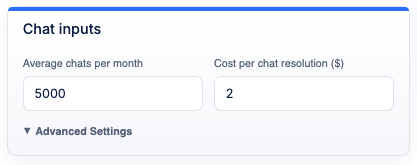
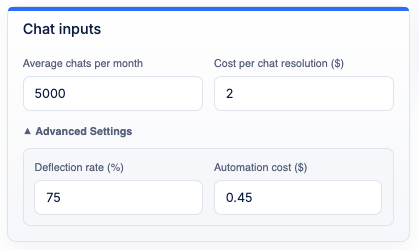
- 5,000 chats per month at $2 each
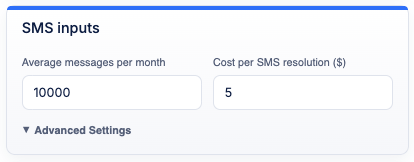
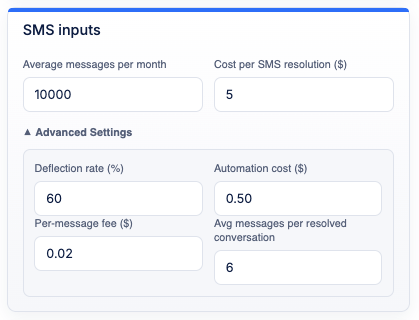
- 10,000 SMS messages per month at $5 each
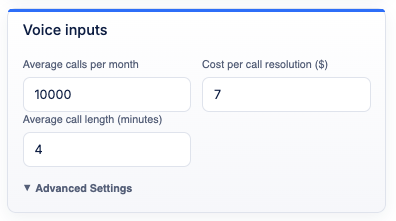
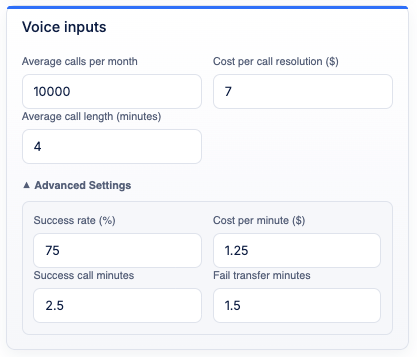
- 10,000 calls per month at $7 each, averaging at 4 minutes
Step 3: Add more KPI and performance metrics
To get a more precise prediction of your ROI, include additional KPIs and metrics that affect your performance and expenses. Call center productivity and success metrics may include:
- Deflection rates
- Per-message fees
- Average messages per resolved interactions
- Call success rates
💡 Example scenario: The contact center has an average of the following metrics:
- Chat has an average deflection rate of 75%, with an automation cost of $0.45
- SMS has an average deflection rate of 60%, with an automation cost of $0.50 and a per-message fee of $0.02. It takes 6 messages on average for an SMS interaction to be resolved
- Voice has an average success rate 80%, with a cost per minute of $1.25. Successful calls last 2.5 minutes and failed calls last 1.5 minutes on average
Step 4: Review projected savings
Once you enter all your data, the AI ROI calculator will model your potential cost savings over 5 years, across channels.
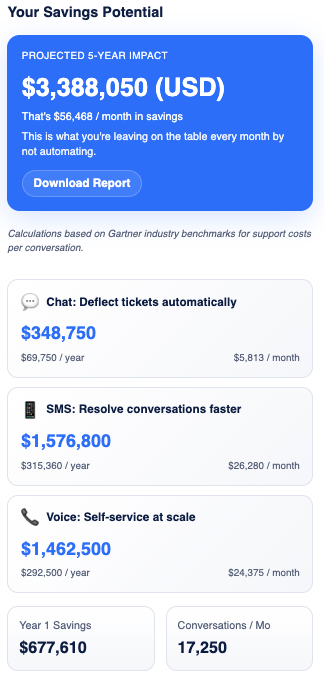
💡 Example scenario: The contact center could see total savings of $3,388,050 over 5 years, with $677,610 saved in the first year. Across channels, those savings look like:
- Chat: $69,750 saved per year and $5,813 saved per month
- SMS: $315,360 saved per year and $26,280 saved per month
- Voice: $1,462,500 saved per year and $24,375 saved per month
For contact centers and customer support teams, those savings could be crucial. Automation can provide not only a much lighter expense report, but also strategic opportunities to turn support into a true revenue driver.
How to build an AI strategy that delivers real ROI
Calculating your ROI is only the first step in building an AI support strategy that scales. Use insights from the software ROI calculator to guide your next steps.
High-performing teams typically follow this approach to investing in and implementing new tools:
- Use your ROI calculation report to secure buy-in: Show executives your projected savings to build confidence and accelerate approval.
- Start where volume is highest: Automate repetitive, high-demand interactions first to achieve quick wins.
- Prioritize the most expensive and impactful channels: Identify channels with high costs and crucial metrics.
- Expand automation gradually: After proving value in one channel, expand your AI use case into another.
- Treat ROI as a living metric: Revisit the calculator as volumes grow, channels expand or automation improves.
Wrapping up
Contact center costs scale with volume. Every new ticket, call or chat session adds to your operational expenses. Without automation, growth almost always means slower resolution times and more overworked agents.
Plus, many AI tools are point solutions which solve only one problem, like deflecting FAQs over chat. These tools often don’t work with or integrate with each other, creating more work and actually getting more expensive in the long run.
An automation ROI calculator will help you identify whether your current AI tools are working for you, find new ways to visualize costs and build a smarter support strategy grounded in real ROI.
If you’re evaluating AI for customer support, start with the numbers—and see your savings.
FAQs
An ROI calculator uses your current operational metrics and expenses, like number of incoming calls and cost per call, to project potential savings with new AI tools.
The ROI calculator is designed for contact center and customer support leaders who want to lower their expenses while maximizing team efficiency and improving customer experiences. It provides a clear view of your current cost gaps and how they could be closed with AI and automation tools.
After using the ROI calculator, you can download a personalized ROI report to show executives and leaders and get buy-in.
