


 Customer Support
 HR & Ops
 IT Support
 Sales & Marketing

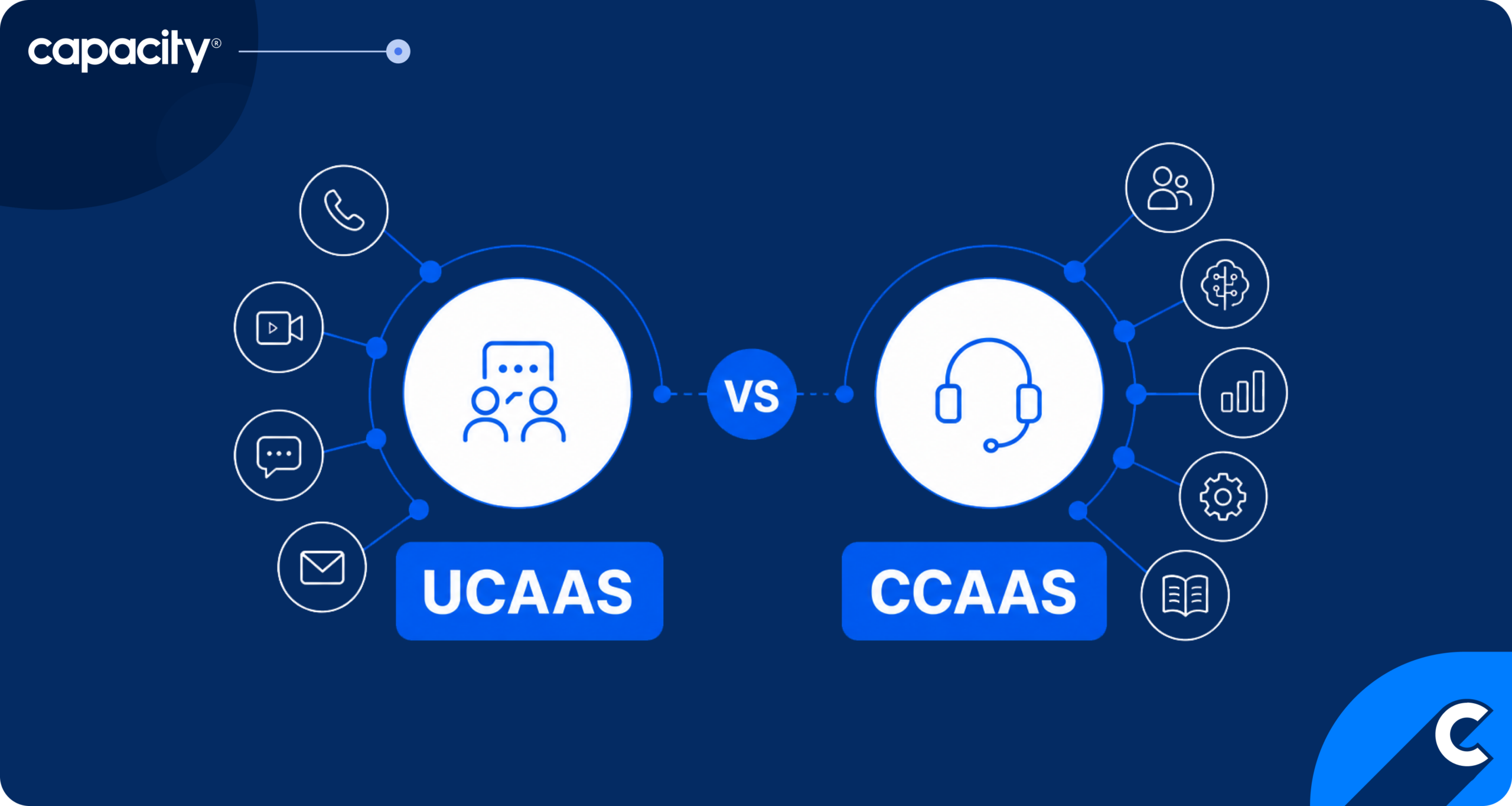
- UCaaS (Unified Communications as a Service) and CCaaS (Contact Center as a Service) are both cloud communication platforms, but they serve different audiences.
- UCaaS supports internal team collaboration through chat, video meetings, and calls between coworkers. CCaaS supports high-volume, customer-facing interactions through routing, IVR, AI virtual agents, and QA tools built for contact centers.
- Choose UCaaS if your main challenges are internal: reaching experts, coordinating remote teams, running meetings. Choose CCaaS if your main challenges are customer-facing: hold times, routing accuracy, agent performance visibility.
- Choose both if your agents rely on CCaaS to handle customers and UCaaS to loop in internal experts when issues escalate.
- AI in UCaaS and CCaaS covers transcription and scheduling assistants, predictive routing, real-time agent assist, and automated QA.
When comparing UCaaS vs CCaaS, which of these platforms do you need for your business? In this practical guide to contact center technology, we’ll explore the difference between internal-focused UCaaS (Unified Communications as a Service) and customer-focused CCaaS (Contact Center as a Service) platforms.
With so many tools for contact centers on the market, it’s easy to lose track of what your company needs. We’ll help you figure out where each platform fits into your current processes and which contact center technology makes the most sense for your business, or whether to consider both.
What is UCaaS?
UCaaS is a cloud-based platform that consolidates an organization’s internal communication and collaboration tools into a single, integrated service delivered over the internet. A company subscribes to a UCaaS provider to host and maintain phone calls, video meetings, and messaging, typically on a per-user, per-month basis. This way, you as a company don’t need to worry about hardware maintenance, software updates, or infrastructure scaling because the provider covers it all.
UCaaS unifies team chat and messaging, voice calling (VoIP), video conferencing, screen sharing, and often SMS or file sharing, making it accessible from a single app across desktop and mobile devices.
For these reasons, the market is growing. Grand View Research, in its 2026 study, found that the global unified communications as a service market is projected to grow from USD 106.4 billion in 2025 to USD 404.2 billion by 2033.
What is CCaaS?
CCaaS is a cloud contact center platform built for managing customer interactions at scale. Again, instead of you owning and maintaining on-premises call center hardware, your CCaaS provider hosts the entire stack in the cloud, typically priced per agent, per month.
This lets contact centers scale up or down quickly, deploy new features without hardware upgrades, and support remote or distributed agent teams. CCaaS also integrates with your knowledge platform to give customers a single source of truth to get answers.
The platform centers on the tools needed to handle high-volume, customer-facing conversations efficiently, such as:
- IVRs (interactive voice response)
- AI-driven virtual agents to deflect or triage simple requests
- Omnichannel routing that intelligently distributes interactions across channels
- CRM integration and real-time guidance
On the management side, CCaaS platforms include analytics and reporting dashboards, workforce management, and quality assurance (QA) tools like call recording, sentiment analysis, and conversation scoring.
Just like UCaaS, the CCaaS market is also growing fast. Grand View Research’s 2026 report estimates that the global contact center as a service market size is set to spike from USD 6.8 billion in 2025 to USD 32.7 billion by 2033.
What are the differences between UCaaS vs CCaaS?
The main difference between UCaaS and CCaaS is their target audience. UCaaS is built for coworkers coordinating with each other. This might be a quick chat, an internal video meeting, or a call. CCaaS, on the other hand, is built for high-volume interactions with customers, where speed, routing accuracy, and consistency matter more than casual collaboration.
UCaaS tools optimize for flexibility and ease of internal coordination, while CCaaS tools optimize for scale, accountability, and measurable service quality, hence the heavier emphasis on IVRs, routing logic, and QA/analytics. To make it easier to understand the difference between the two tools, take a look at the side-by-side comparison.
| Aspect | UCaaS features | CCaaS features |
|---|---|---|
| Primary audience | Employees talking to employees | Employees talking to customers |
| Core purpose | Internal collaboration and communication | Managing customer interactions at scale |
| Key channels | Team chat, VoIP calling, video conferencing, screen sharing | Voice, chat, email, SMS, social media |
| Primary integrations | Calendar, file storage, productivity suites (e.g., Microsoft 365, Google Workspace) | CRM, helpdesk/ticketing systems, workforce management tools |
| AI use cases | Meeting transcription/summarization, smart scheduling, virtual backgrounds/noise cancellation | Virtual agents/chatbots, IVR automation, sentiment analysis, agent assist, QA scoring |
| Typical buyers | IT/operations teams supporting the whole organization | Customer service/support and sales leadership |
| Example vendors | Microsoft Teams, Zoom, RingCentral EX | Genesys, NICE (CXone), Five9, Twilio Flex |
Where does CPaaS fit in?
CPaaS (Communications Platform as a Service) is the developer-facing API layer beneath both UCaaS and CCaaS. CPaaS provides APIs and SDKs for voice, video, SMS, chat, and email. Developers can use them to embed communication features into their own custom applications. So when comparing UCaaS vs CCaaS vs CPaaS, the distinction is that UCaaS and CCaaS are ready-made products you subscribe to and configure, while CPaaS is infrastructure you build on top of.
A CCaaS provider’s IVR or SMS notification feature, for example, may run on top of a CPaaS vendor’s underlying telephony network. But CPaaS is also used independently by companies that want highly specific, custom-built communication features that don’t fit into their UCaaS or CCaaS product. For example, a ride-share app sending automated SMS updates, or a healthcare app embedding secure video visits directly into its own interface.
Should contact centers use UCaaS, CCaaS, or both?
Whether your contact center should use UCaaS, CCaaS, or both really depends on your unique case. For example, businesses that need to unify information for their staff, automate onboarding, help cover IT support, and similar inquiries would benefit from having UCaaS, while companies with a focus on customer support would benefit from CCaaS.
However, most companies manage both, so having a system that can cover UCaaS and CCaaS integration would make the most sense. So, let’s see how it plays out for each unique need.
If your main problem is internal team communication
If your contact center supervisors and agents mainly struggle with reaching a subject matter expert for an escalation, running team huddles, keeping remote agents connected to the rest of the organization, and coordinating among themselves, UCaaS is the right starting point.
It won’t fix customer-facing metrics like average handle time or first-call resolution, but it addresses the internal friction that often makes those metrics worse in the first place, since agents can’t serve customers well if they can’t get quick answers from colleagues.
If your main problem is customer-facing service levels
If you struggle with long hold times, inconsistent routing, poor visibility into agent performance, or a lack of omnichannel support, CCaaS is the more direct fix. It’s designed for the metrics contact centers are usually measured on: service level, first-contact resolution, QA scores, and channel deflection through IVR or AI virtual agents.
Adding UCaaS on top wouldn’t address these problems, since UCaaS isn’t designed to manage high-volume customer interactions or provide the routing and analytics infrastructure CCaaS offers.
If you have both internal and external communication gaps
Most contact centers eventually need both. When communication between your team is seamless after integrating UCaaS, agents can do a much better job dealing with customers, and for that you need CCaaS. Agents need CCaaS to handle and route customer interactions efficiently, but they also need UCaaS to quickly loop in a supervisor, a billing specialist, or another department when a customer issue requires it.
This growing overlap between the two — often called UCaaS-CCaaS convergence — is why many vendors now sell bundled platforms instead of separate tools.
This way, agents can move between customer-facing and internal conversations without switching platforms entirely. Other platforms take it up a notch and add contact center automation solutions together with CCaaS and UCaaS integrations for the most rounded service.
Navigating AI in 2026
How is AI changing UCaaS and CCaaS systems?
AI is changing UCaaS and CCaaS systems by making them more intuitive, personalized to each user’s needs, and faster. Now, instead of manually gathering information or answering the same Slack message from five different people, you can have automated UCaaS that covers meeting transcriptions, gives instant answers, speeds up onboarding, and more.
AI-powered CCaaS features like AI agents, real-time agent assist, predictive routing, auto QA, conversation intelligence, and agentic AI for contact centers make the customer experience better and help you scale without sacrificing quality. Let’s see what role AI plays in UCaaS and CCaaS.
AI in UCaaS:
- Automatically transcribes calls and video meetings, then generates summaries and action items, so employees don’t have to take notes manually or rewatch recordings to catch what they missed.
- Assistants analyze calendars and availability across a team to suggest optimal meeting times, reducing the back-and-forth of manual scheduling.
- Helps identify the best performers by evaluating each person’s contribution.
- AI can even provide live translations to help your staff communicate across countries and languages.
AI in CCaaS:
- Conversational AI now handles full customer interactions end-to-end for common requests (order status, password resets, appointment booking).
- Listens to live conversations and surfaces relevant knowledge base articles, next-best-action suggestions, or compliance prompts to agents while they’re still on the call.
- Predicts which agent is statistically most likely to resolve a given customer’s issue successfully and routes accordingly.
- Reviews 100% of interactions, automatically flagging compliance issues, tone problems, or coaching opportunities.
- Analyzes interactions at scale to surface trends, like recurring complaint themes or emerging product issues, that would be invisible in individual call reviews.
To get the best results, it’s recommended to unify both platforms so they’re always using recent and accurate information for employees and customers. Capacity, a CX automation platform, for example, functions as a unified AI layer that plugs into existing CCaaS and UCaaS infrastructure to handle knowledge retrieval, train omnichannel AI agents across voice and digital channels, coach human agents in real time, and centralize analytics across the whole operation. This means that with one tool you get AI capabilities without ripping out and replacing your current platforms.
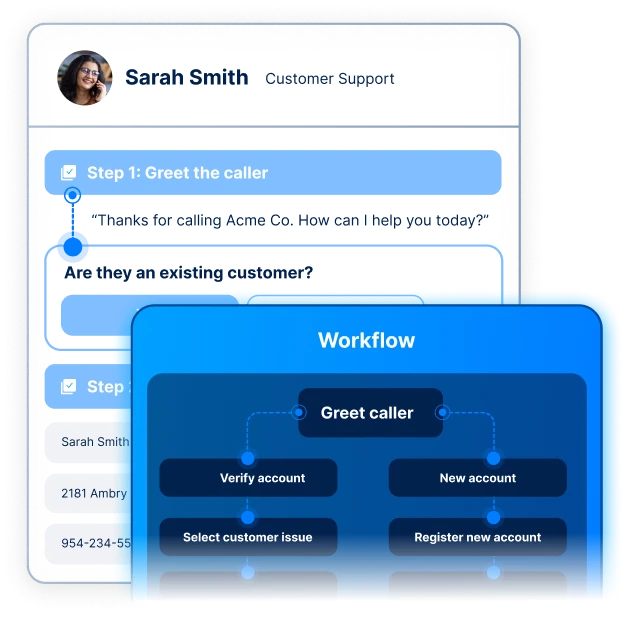
A great example of contact center automation done right is the NHS, the UK’s public healthcare system. During COVID-19, the British Government needed to move fast and help the public track active cases. The NHS partnered with Capacity to roll out Agent Guidance, a CX automation platform for contact center agents.
Agent Guidance gave workers real-time guidance to help cover as many inquiries as possible. Across nearly 20,000 agents, Agent Guidance runs 57,840,000 scripts per year, automating a huge portion of agents’ work.
How to choose the right platform for your contact center in 5 steps
To choose the right platform for your contact center, pay attention to cost of ownership, AI capabilities, integrations, and other components that ensure long-term success. It’s better to take your time browsing solutions, as you want one tool to hit all the bases. Take a look at the five steps to get you started.
- Audience served — Determine whether the core problem is internal or external. This is the first fork in the road: UCaaS solves for the former, CCaaS for the latter, and most contact center services eventually need both.
- Channel requirements — Map out which channels customers use to reach you today, and which you’ll need tomorrow. Not every CCaaS platform supports true omnichannel routing, so verify this distinction directly with vendors.
- AI capabilities — Evaluate what’s built into the platform natively (IVR automation, predictive routing, auto QA) versus what would require a separate layer to add capabilities such as knowledge retrieval, AI agent training, or real-time agent coaching. Also consider how easily new AI features can be added later without a full platform migration.
- CRM/WFM integrations — Check compatibility with your existing CRM and workforce management tools, since a contact center platform that doesn’t sync customer data and agent scheduling in real time creates manual work and data gaps. Native integrations are generally more reliable than third-party connectors.
- Total cost of ownership — Look past the per-agent, per-month sticker price to account for implementation and migration costs, training time, add-on fees for premium features like advanced analytics or agentic AI, and contract length or termination penalties. A cheaper platform that requires costly custom integrations or lacks scalability can end up more expensive over time than a pricier, more complete solution.
Enhance your contact center platforms with automation
When comparing UCaaS vs CCaaS, it’s important to look into the future, so that you don’t get many separate tools only to cause data silos and inefficient operations along the way. True efficiency and results show up when all your systems connect and can draw from one source of truth.
That’s Capacity’s main goal. It’s a single platform for virtual agents, human agents, QA, and conversational intelligence that replaces 4-5 disconnected vendors, saving you money and headaches in the future. It layers on top of UCaaS and CCaaS platforms to enhance their existing features.
Capacity’s AI Knowledge Orchestration Layer ripples through most operations, like AI agents that help automate routine tasks, AI agent assist that helps your team do their work faster and better, and post-conversational features like QA that scores 100% of interactions, analytics, and reporting, and finally outbound campaigns that help you create a well-rounded omnichannel call center.
If this sounds like a solution for your business, take a look at our integration list or request a demo.
center Into a
true revenue driver
FAQs
The difference between UCaaS and CCaaS is that UCaaS supports internal communication between employees (chat, video, VoIP calling), while CCaaS supports external communication between employees and customers (omnichannel routing, IVR, QA, analytics).
Yes, a business can use both UCaaS and CCaaS because agents often need CCaaS to manage customer interactions and UCaaS to quickly loop in colleagues or supervisors when an issue needs internal escalation.
Whether UCaaS or CCaaS is better for a contact center depends on your goals. CCaaS is built for contact center operations, since it’s designed around routing, service levels, and QA. UCaaS complements it but doesn’t replace it, as it isn’t built to manage high-volume customer interactions.
CPaaS is the developer-facing API layer that provides the underlying building blocks that UCaaS and CCaaS platforms are often built on. Companies can also use CPaaS directly to build fully custom communication features.
A company needs CCaaS when the priority is managing customer-facing service levels at scale, and UCaaS when the priority is improving internal team coordination and collaboration.